FUPAYME
SMS Opt-In Example
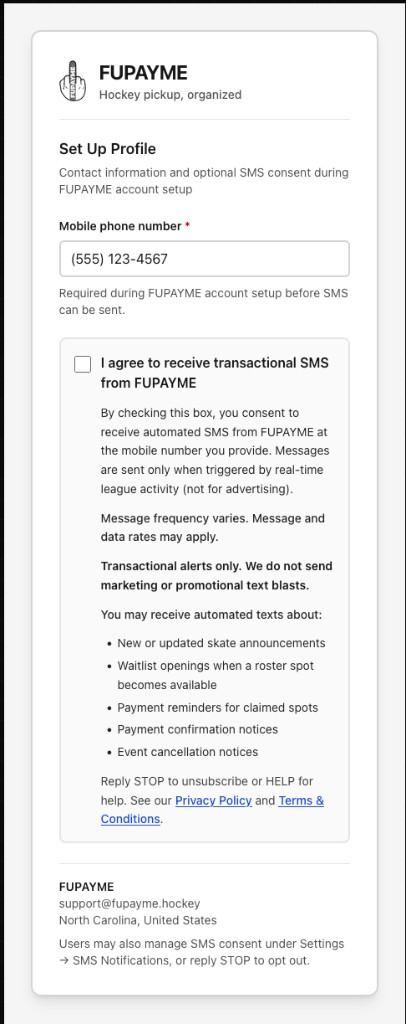
Complete, branded opt-in shown to FUPAYME users during account setup. The checkbox is unchecked by default. Users must enter a mobile number and explicitly check the box to receive transactional SMS.

FUPAYME
Hockey pickup, organized
Set Up Profile
Contact information and optional SMS consent during FUPAYME account setup
Required during FUPAYME account setup before SMS can be sent.
Opt-in workflow
- User creates an account at www.fupayme.hockey/signup and agrees to our Terms and Privacy Policy.
- On the onboarding screen (Set Up Profile), the user enters a mobile phone number and may opt in by checking the branded FUPAYME SMS consent checkbox (shown above). Message types are listed on the checkbox label: skate announcements, waitlist openings, payment reminders, payment confirmations, and cancellations.
- Users can change SMS preferences anytime under Settings → SMS Notifications in the app, or reply STOP to unsubscribe.
Screenshot-friendly view (no page chrome): www.fupayme.hockey/legal/sms-opt-in?embed=1. Hosted opt-in example image: www.fupayme.hockey/legal/sms-opt-in-workflow.png